

There’s this new technology around and maybe you’ve heard of it. It’s called artificial intelligence, and it’s abbreviated “AI” and there’s a chance it might become kind of a big deal.
Seriously though, everyone has experienced AI. In fact, in some quarters, it is the only thing that some academics can think about, and the subject of AI can provoke strong reactions. For the last several months, I’ve made a commitment to working with AI tools for at least 30 minutes every working day, either in my everyday work or just to experiment. Because I can’t make informed decisions about something I don’t understand, and I can’t understand a technology that I don’t use.
In that spirit, and as a second installment in my running series about tools that can make our lives easier in higher education, I want to focus on 10 ways I’ve used generative AI tools to help me be a more productive and present professor.
Where I stand and what I use
Here’s where I’m currently at, with regards to AI use.
Without exaggeration, artificial intelligence is an epoch-defining technology on the order of the wheel and electricity. It has the potential to do both great good and great harm. Or rather, we human beings have the potential to use it in either, or perhaps both of those ways. The worst move that a person can make with AI today is to go to an extreme: to lay down a reactionary blanket refusal to engage with it on any level or to adopt an uncritical acceptance of it at every level. The proper role of a scholar and an intellectual regarding AI is to engage with it, experience it for yourself, and think about it critically and circumspectly. Then and only then you can start making real decisions about it. Which could mean refusing to use it; or could mean using it mindfully and in accordance with the Law of the Whole Person.
I am aware that there are concerns about the detriments of AI related to student learning and its environmental impact, among other things. For me, the jury is out on those concerns. For the time being, I’m going to engage with AI because I believe there is the potential for great good in it. I remain open, unlike some who go to extremes, to being wrong and changing my mind in the future.
If you want to know more, leave a comment. For the rest of the post, I want to talk specifics.
My main tool right now is Gemini Pro. This is because I have a Google Workspace account that I use for my writing and speaking and it comes with Gemini Pro, so I’m already paying for it. But I will also say that I find it to be generally superior to all the other tools, even if some of them are better at certain niche tasks. I also like how Gemini is integrated with Google Docs and Sheets, which I use a lot.
I have also used Grok and I like it quite a bit, especially because I’m a Tesla owner and Grok is available inside the car. I can have a chat with Grok while I’m driving and it syncs with my other devices so I can pick up the chat later. This has come in extremely handy in a few cases. But I haven’t yet bumped up against the limitations of the free version, seemingly, so right now I’m not paying for it1.
All the other major players like ChatGPT, Copilot, Claude, and so on I have tried, I still do use these on occasion, but I haven’t found them to be better than Gemini Pro or Grok. I will say I have decided never to use Perplexity again after the company released the Comet browser and then marketed it specifically to students as a means of cheating.
These tools are here, despite appearances, to serve humanity and that starts with you and me. Here are ten ways I’ve found AI tools to be useful in this regard.
Use #1: Writing quizzes for my LMS
I work on a Blackboard campus and I give weekly 15-question multiple choice quizzes on Blackboard to my students as practice. They are useful but tedious to make. Fortunately, I recently discovered a workflow that makes Gemini create these quizzes. I first give Gemini the following prompt with the blanks filled in.
Please generate a 15-question multiple-choice quiz with [NUMBER] options per item over [SPECIFIC TOPICS] that I can upload to Blackboard for use in one of my classes. The output must be tab-separated text using the official Blackboard format. For multiple-choice questions, ensure each option is immediately followed by the word ‘correct’ or ‘incorrect’ to indicate the status of the answer, and include no header row. Also use only character encodings that will render properly in Blackboard in a browser, such as Unicode -- do not use LaTeX to format math.
If all goes well2, Blackboard generates something that looks like this:
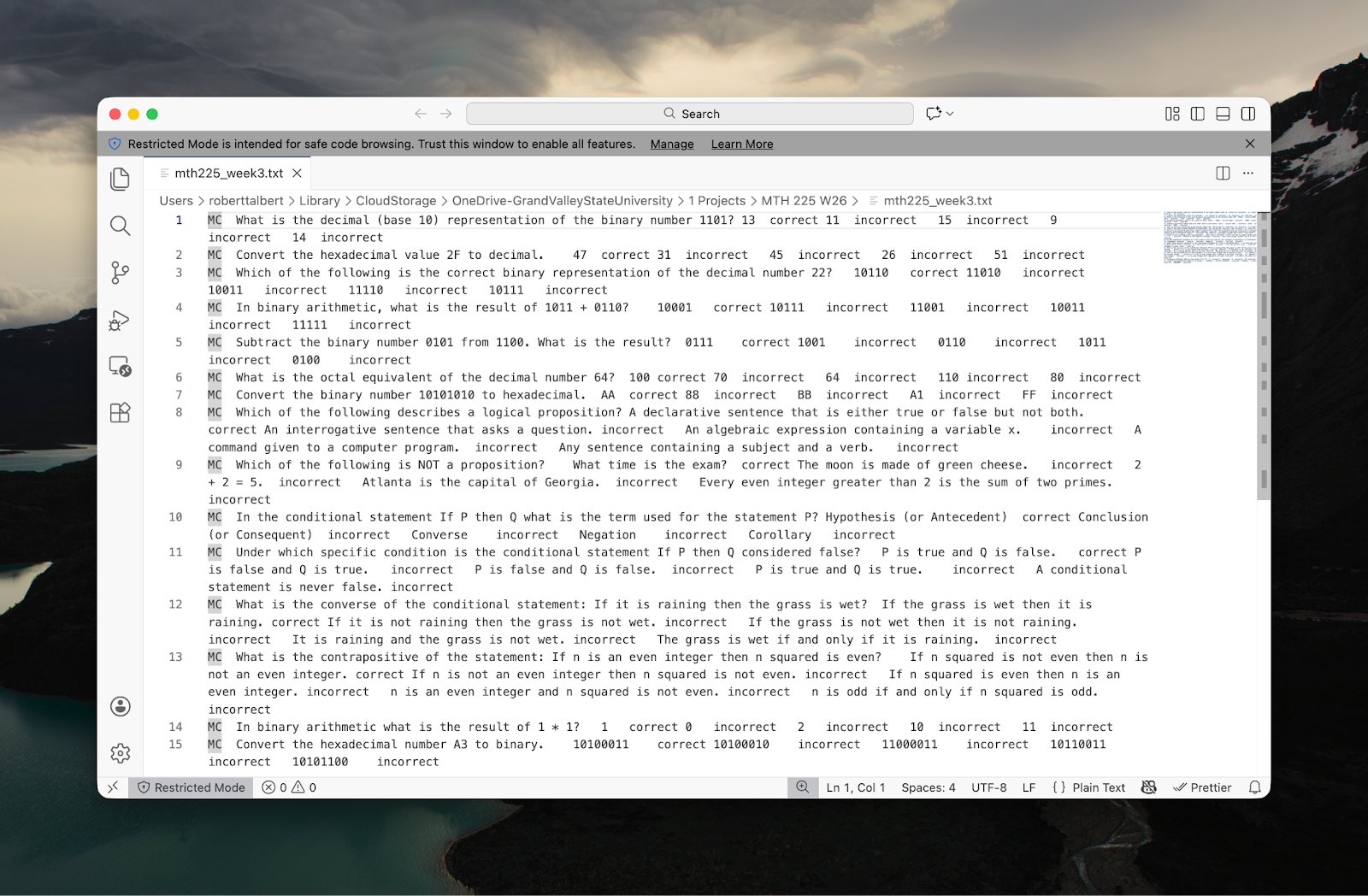
Notice, Gemini created all of the content in this quiz. All I gave it were the topics to be used.
Then save this file with a .txt extension; go to Blackboard where the quiz should go and create a “Test”; then click the “plus” button and select “Upload questions from file”; then upload the text file. Voila, you have a deployable quiz.
I do not simply give this quiz out to students the moment I upload the questions. Many times there are questions that are poorly written, some have incorrect formatting, some just need to be deleted. But editing the quiz takes about two minutes, whereas making the quiz from scratch would take about 30.
Use #2: Illustrating your syllabus
As I was preparing my current classes back in November, Google released Nano Banana, its AI image generation engine. I decided to have a bit of fun: I took the syllabus, uploaded it to Gemini Pro, and gave NanoBanana the following simple prompt: Based on the attached course syllabus, create a graphic that describes the course in the style of a pirate treasure map.
To my great surprise, it came up in less than a minute with the following visual, which I think did a better job of explaining the course than the syllabus itself did:
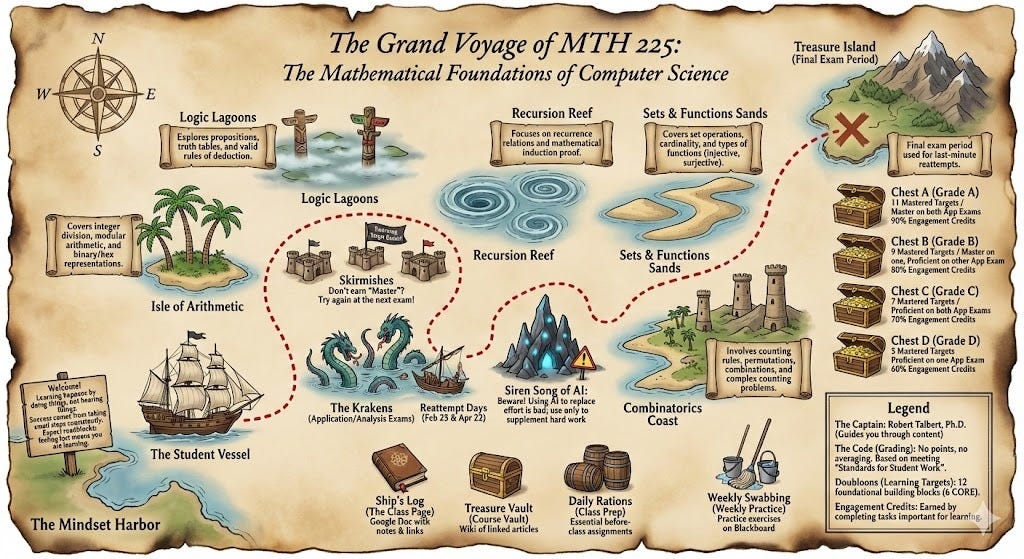
This was awesome, fun, and useful and I gave it out to students on the first day of classes.
Use #3: Cracking tough grading cases
I do not use AI to grade my students’ work, and you shouldn’t either, for a lot of good reasons. However, I have definitely used AI as a second set of eyes on a piece of grading that I just couldn’t figure out on my own.
I can’t give any specifics here because that would be divulging student identities. But an example that I commonly run into is a proof of a mathematical conjecture that I am certain has some sort of problem in it, but I can’t figure out exactly what. It’s a little like looking at computer code that has a glitch, but you can’t find it. And just like computer programmers might use AI to help find those glitches, I can type up a paraphrase of a student’s work and their general solution method, feed it to Gemini and have it help me identify where the issues are. Gemini Pro has been able to identify these cases about two out of every three times. Then I am in a position to give my human feedback to the student on their work.
Use #4: Simplifying syllabus content
You also shouldn’t use AI to write your syllabus, in my view, unless you’re just curious. But it is absolutely the case that AI tools can be used to rephrase parts of your syllabus to simplify the language. For example, here’s a section of my current syllabus with some serious policy language:
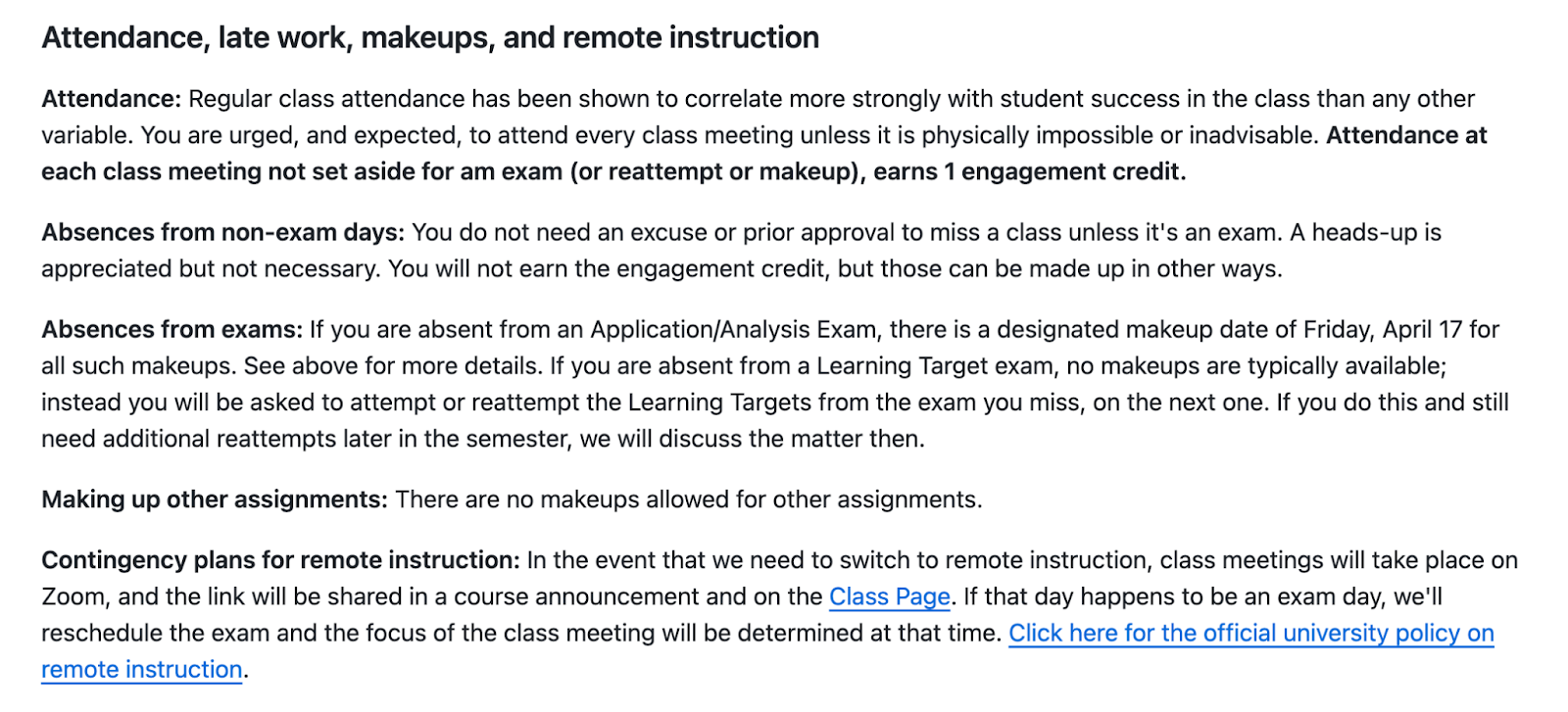
This is okay, but after giving it to Gemini and asking it to make the language simpler and friendlier for college students, I got this:
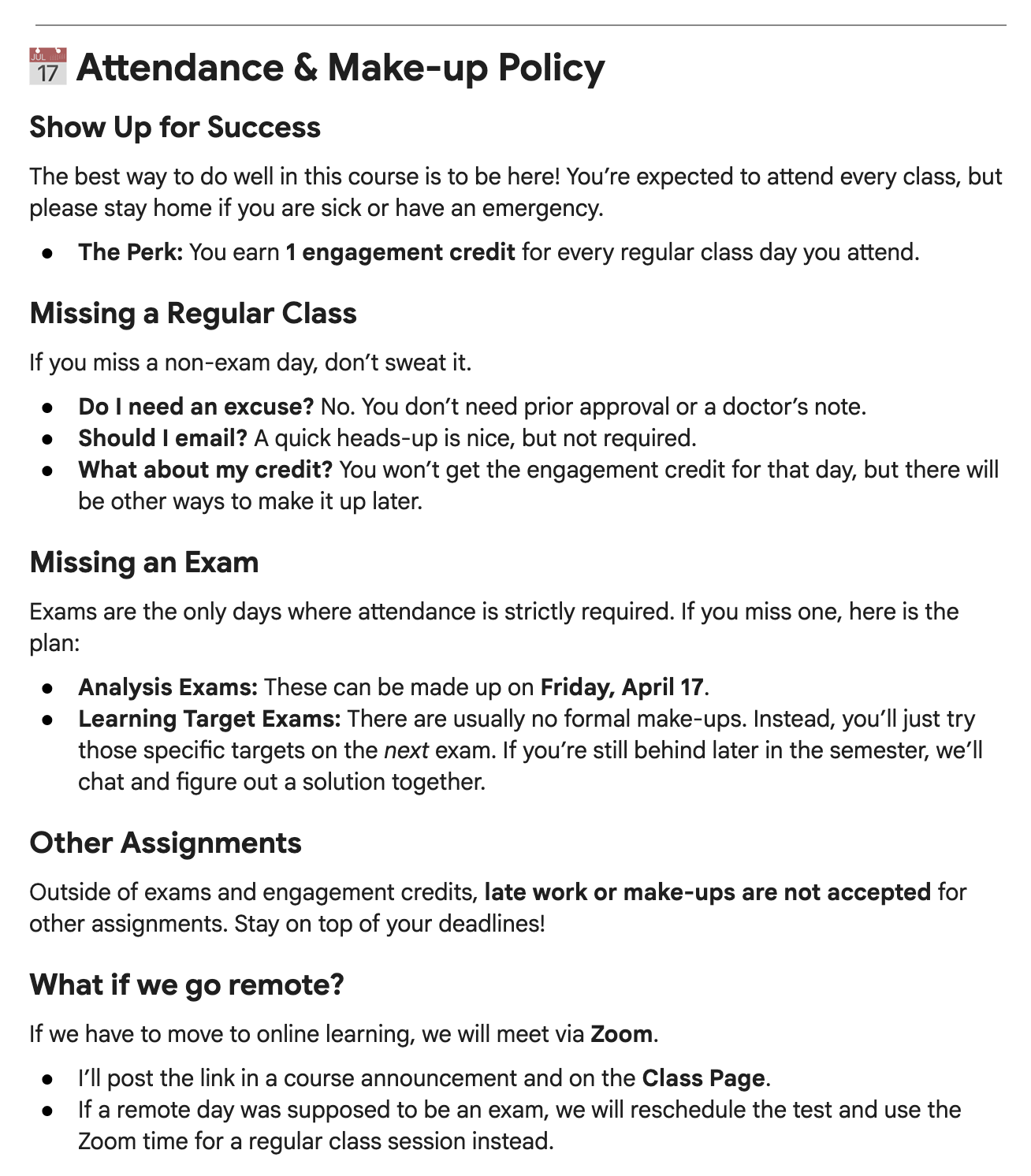
This seems much more appealing to the eye and also a little friendlier on the brain when you read as a college student.
Use #5: Coming up with good writing prompts and problems to solve
Coming up with good activities or assignments that actively engage students in interesting concepts, but aren’t way outside of their skill set or use content that isn’t covered in the class, is hard. I’ve found AI tools to be very helpful in giving good suggestions here.
For example, in my Discrete Structures for Computer Science class I needed some interesting problems about modular arithmetic. This is a topic with a lot of good applications that are way beyond current student abilities, and a lot of simple exercises that are too easy to be considered “problems”. I needed something in between. I asked Gemini for ideas, and it came back with this:
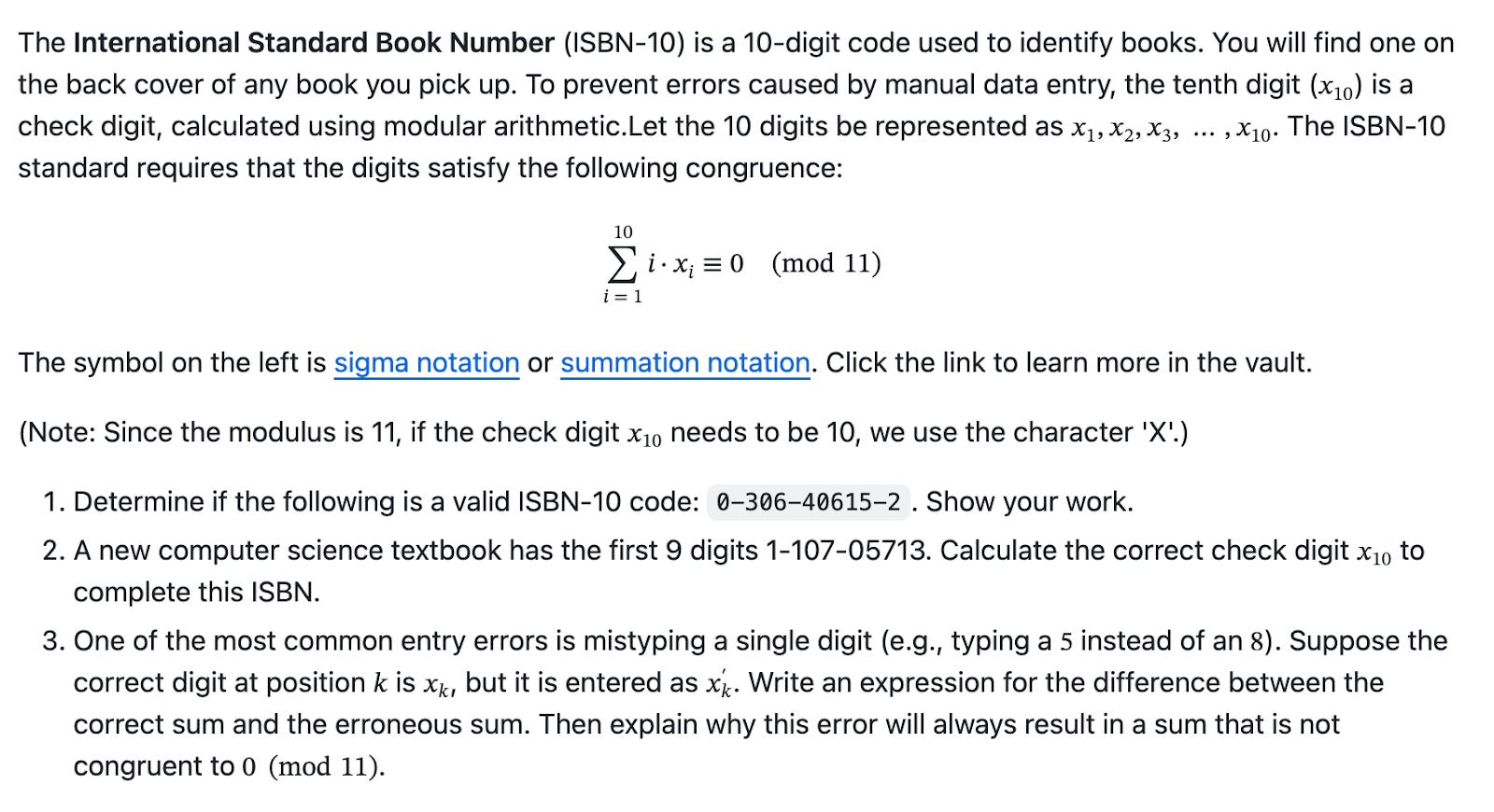
I had to clean this problem up a little to make it truly fit where my students are in the course. But once cleaned up, it’s a very good fit for what I needed.
Use #6: Getting suggestions for overall course or lesson design
As I was coming off of my sabbatical and getting ready to re-enter the classroom, I felt like my Discrete Structures for Computer Science course needed a bit of a refresh. I’ve never been happy with the first four weeks of this course, which covers some extremely basic ideas about division and integer representation. Both my lectures and my active learning activities were super boring. So I turned to Gemini to ask for better ideas.
It gave me not only a week-by-week suggestion on content coverage that was better than what I had planned, it gave me a great activity to use during the first week that introduces modular arithmetic in a completely self-contained and fully active way — a game where students move paper clips into cups according to the outcome of three dice rolls3. It was a really well thought out, physical, active learning exercise that made a huge impression on my students. The following week, we looked at division in binary, and more than one student was asking me how we might adapt that game to a base 2 version.
Use #7: Modeling deliberate practice
Over at the Grading for Growth blog, I’ve been writing a lot about deliberate practice and its role in learning, and grading. The gist of those articles has been that a course’s grading system is only as good as its ability to elicit deliberate practice from students. And the quality of deliberate practice depends on your ability to self-generate feedback. I have found that AI tools are exceptionally good when used as practice devices.
Here’s one example. In my discrete structures course I’ve described, we are currently looking at logical propositions. For example, given a conditional statement, I want students to be able to tell me the hypothesis, conclusion, converse, contrapositive, and negation of that conditional statement. We practice this in class, but that practice can be extended indefinitely outside of class using an AI tool. Simply go to your favorite tool and give it the following prompt:
Please create a practice quiz involving 30 conditional statements in English, but in various sentence formats, where I need to identify the hypothesis, conclusion, converse, contrapositive, and negation of those statements.
In Gemini at least4, Almost instantaneously you will get an interactive quiz that does all of these things. And if you’re a student in my class, you can just keep doing this over and over again until there are no mistakes. It replaces the “back of the book” in a textbook and frankly is probably better than a textbook in helping master this concept.
Use #8: Finding research papers to read
I’ve written here before about the digital tools I use while on sabbatical, and I have to give a renewed shout out to scite.ai. Part of what I was doing was overhauling the research summary on flipped learning. I was doing the usual academic database searches, but I felt like I was missing a lot and wasn’t giving the “right” queries to the databases to get what I needed.
Using scite.ai helped me get past this. Briefly, it is an AI-powered web tool specifically for finding research papers, extracting their results, and comparing them against each other. All I had to do was give the tool a general question or request that I had, and it did the rest, bringing back a variety of published research papers with an overall summary and detailed citations for each so I could go fact check.
Another tool that was extremely useful was NotebookLM. Whenever I would find a new paper to read, I would put it not only into Zotero for human reading and annotating but also into a topical NotebookLM. For example, I have an entire NotebookLM on flipped learning and the COVID-19 pandemic. NotebookLM is well known for being able to generate interesting media out of the items dumped into it, such as fake but hyper-realistic podcast interviews. But for me, the best use was just chatting with the notebook. I read every paper that I put into my NotebookLMs, but sometimes struggled to find the big picture. I was able to go to the NotebookLM and ask it something like: What were the overall impacts of flipped learning during COVID on things like student engagement, motivation, and satisfaction? And it would look through the papers — and only those papers that I gave it — and give me a detailed breakdown of an answer with links to specific locations in specific papers that I could then go and double check the notebook’s answer. It was a lot like having a smart graduate assistant who could help me with my research.
Use #9: De-escalating emails
I don’t outsource my emotional intelligence to AI, but I also don’t trust my emotional intelligence 100%. Just as I can use AI tools to simplify and make my syllabus language friendlier, I can also use them to clean up and tone down emails that I might inadvisedly be about to send. Here is a mock-up of one such email, which I would theoretically send to a colleague after they texted me at 8:00pm on a weeknight about action on a particular matter that could easily have waited until the next day5:
Dear [Name], I received your text about the matter for tomorrow. Please do not ever text me after 6 p.m. on a weeknight unless it is an actual emergency. I reserve this time for my family and for my rest, and I do not wish to be bothered with text messages that pertain to matters that can wait until the morning. Thank you for your attention to this matter.
So yeah, it would be a bad idea to send this. Fortunately, I have just enough awareness to realize that I have just composed an email that makes me look like the most toxic coworker ever. But, the message — that I do not want to get work communications in the evenings, unless they are true emergencies — is important and worth sending.
I gave this to Gemini and asked: Here is an email I was about to send to my colleague. Could you please suggest an alternative wording that gets the main message across, but softens the language and makes it friendlier and more professional?
The result:
“Dear [Name], I received your text regarding tomorrow’s agenda—thanks for reaching out. I’m currently making an effort to disconnect from my devices after 6 p.m. to focus on family time. If something comes up in the evenings that isn’t an immediate emergency, would you mind sending it via email instead? That way, I can give it my full attention as soon as I’m back at my desk in the morning. Best regards, Robert”
This was actually one of three rewrites that Gemini suggested, including one that was “soft and collaborative” and another that was “short and direct”. This one was labeled as “balanced and professional” and I think it succeeded at both. I would feel very good about sending that result as an email.
Use #10: Making sense of university policies
Finally, in my view, one of the best uses of AI is to help navigate complicated documentation of any sort, whether in a computing language or especially in your university’s thicket of policies.
For example: I am looking into starting one-on-one faculty coaching. (More on that some other day.) This would be a very different financial situation than doing a paid keynote talk or workshop – I would be setting up and running my own small business, rather than being paid as a contractor. The more I thought about it, the more I realized I needed to be careful to avoid violating any policy in my faculty job that would preclude all this.
I started searching through university policies for items about “outside employment”, “conflict of interest”, and other related ideas. It got confusing really fast and it was difficult to know exactly which policy or policies applied to me, and whether there were other legal terms that I ought to be searching for but wasn’t thinking about. All of these policies are either written or finalized by lawyers, and being not a lawyer, even if I could find something that seemed to apply to me, it was not making sense.
This is where Gemini came in very handy. In my case, I wrote up a prompt that explained exactly what I was trying to do and then gave it the entire faculty handbook and asked it to find relevant policies and explain how those might or might not apply. Importantly, I also asked Gemini the following question: What questions am I not asking about my situation that I should be asking? This surfaced a few very important ideas and especially specific terminology that I needed to look for in our faculty handbook policies.
In the end, I took Gemini’s output and went to our HR department, and thanks to the AI research was able to frame a better question about what I was needing to know. They were able to connect me with two other people on campus who I ended up talking to, and now I have a solid plan for moving forward and doing this by the book.
The situation illustrates a common theme about good use of AI: You don’t use it to replace a human being necessarily. You use it to augment yourself and to create something, whether it’s an explanation or a piece of artwork or something else, that you can then take to a real human being who can give you the final product.
Conclusion
Once again, I’m aware that artificial intelligence evokes a wide range of very strongly held beliefs. It’s actually quite hard to talk about generative AI these days without getting into an argument. I’m not suggesting that people should use artificial intelligence tools. I’m only pointing out here that there are real uses of these tools that support the human experience and can make individual faculty members more intentional and more grounded in their work. And I think those are worth exploring.
However if Tesla would bundle SuperGrok and Full Self Driving together for a discount…
There are sometimes glitches in the formatting that I have to address through repeated prompting.
The details of this game are available upon request.
I checked and this works with the free version of Gemini as well.
Not that this situation actually happened, or anything.
Interesting, thanks for this! No.9 troubles me a bit (see also the “Humanize this” feature in Grammarly) because I see self-regulation as a skill that needs to be practiced if one wishes to be a caring participant of humanity. I’m sure the argument could be made that using AI to “assist” in this could illuminate what it might look like to regulate oneself, but it farms out the actual emotional, cognitive, and physiological processes by which we do so. In these times, in particular, I feel like that particular skill is a treasure, and every time I practice it for myself I feel stronger in my capacity to pick my battles and direct my energy where it is most needed.