

Have you ever noticed that some people have a near-religious devotion to brand names? In the bass guitar world where I often live, some players are hard-core Fender disciples, while others think Fender sucks and Spectors are where it’s at, or Stingrays, or something else. Or maybe it’s Ford vs. Chevrolet; or DeWalt power tools vs. Milwaukee; and on and on. This always seemed weird to me because these tools are just instruments — they are not the music itself. And as a person grows and changes as a player, or a driver or a craftsperson, what worked for them once may not any more1.
I think “productivity tools” are the same way. Productivity, which I think of as intentional engagement with systems that connect all our horizons together, can’t be reduced to this tool or that tool, to a collection of apps and lifehacks. But you might not be able to tell this if you look at productivity influencers on social media, whose job seems to be hawking products. You should never confuse productivity with tools, and in that spirit, here are some tools that I used to use, sometimes religiously, but just don’t any more.
But first a word about this
Most of the tools I am listing here, I stopped using because I just didn’t want to use them any more. This means I am going to point out some negatives that put me off using them, for good. If you’re a user of those tools now — for example you’re a devoted Evernote person — you might get offended. I would ask you to hear me out, and sit for a second with that perceived offense. Why are you getting upset that somebody else didn’t care for your favorite app? It’s that feeling of partisanship, the felt need to defend the honor of an app, that deserves some attention.
Also, this was a hard article to write because, well, I don’t use these tools for some years and so I had sort of forgotten about them. It’s entirely possible that some of the final-straw moments with these have been improved upon by now. That’s fair; point those out in the comments.
Prezi
What is it: Prezi is2 a presentation tool that had at the time a unique selling point: It doesn’t use slides, but rather an infinite canvas. You add content into it, and then rather than going slide to slide sequentially, you zoom in and out and pan across the canvas to highlight the content. Here’s an example (click the “play” icon to start the action).
Why I used it: When I started branching out into giving workshops and keynote presentations I was looking for an alternative to PowerPoint and (God help me) Beamer3. I was looking for something with a distinct visual style and which was web-based. Google Slides, released 2006, was still in a very raw form. Prezi was all the rage back in those days so I signed on happily. It was just what I was hoping for: A digital storytelling medium that captured audience interest and set my presentations apart (except for all the others using Prezi).
Why I stopped: It captured too much audience interest. I started noting that the questions I was getting following my talks that used Prezi were increasingly along the lines of, “What’s that presentation tool you’re using? It’s really cool!” and increasingly less about the actual content of my talk. Also — I swear I am not making this up — someone in my audience one time had to literally run from my talk straight to the bathroom, because the constant zooming and panning gave them motion sickness, and divest themselves of their breakfast.
Lesson learned: When the tool starts competing with your content for attention, it’s time for a different tool. Also, presentation tools should not cause vomiting4.
OmniFocus
What is it: OmniFocus is, arguably, the progenitor of all task management apps. Originally designed for tight integration with the GTD approach, it has a powerful and deep feature set and a beautiful user interface.
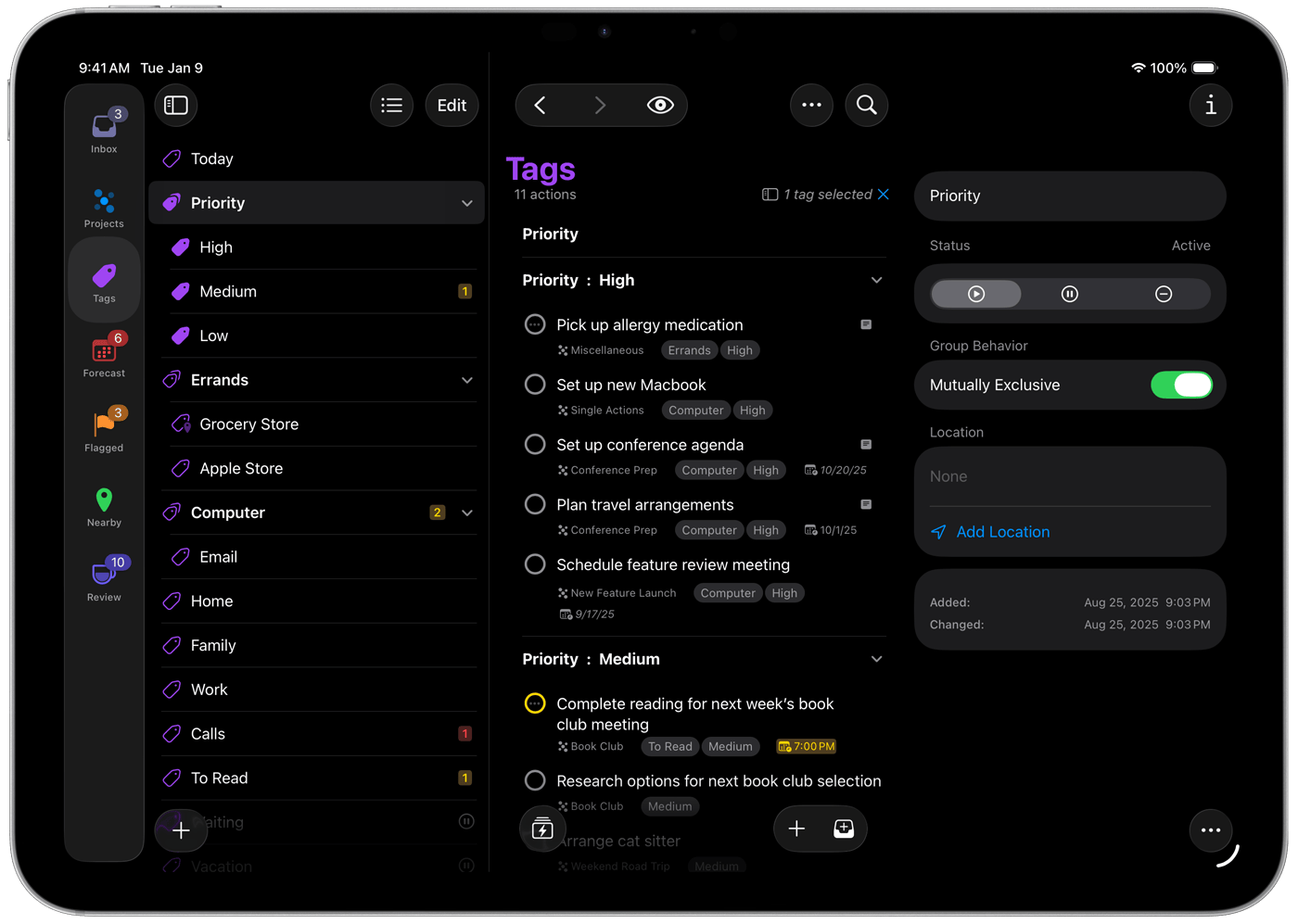
Why I used it: OmniFocus 1.0 appeared on the scene in January 2008, about a year after I had read David Allen’s Getting Things Done book and started seriously practicing GTD. Before its official release, OmniFocus was a collection of AppleScripts that interacted with OmniOutliner, collectively known as “Kinkless GTD” and I had been using that system, because I had a lot of stuff to wrangle and a digital approach made sense for me. And I was a Mac and iPhone user (important; see below). I was an alpha (!) tester of OmniFocus in its pre-1.0 form, when those janky AppleScripts were being tidied up into a real app, and I was very excited — and was not disappointed when the OG version was released to the public.
Why I stopped: It’s Mac/iOS only, and always has been. This is not a problem if you are dedicated to Apple products, but around 2010 I ditched my iPhone for an Android device, and I was increasingly finding myself hopping from Mac to Windows to Linux on a regular basis. To me the whole point of a digital-first approach to GTD is to have your information available anywhere on multiple devices — otherwise why not just put it in a paper notebook? — and I didn’t want to commit to an operating system.
I am aware that OmniFocus now has a web app. I’ve tried it. It lacks many key features from the main app, requires a separate subscription on top of the already-somewhat-steep cost of a license for the app (around $80), and in my experience was clunky. So, no thanks.
Lesson learned: Don’t use a tool if it requires you to commit to not only that tool, but also any other tool (e.g. operating systems) that are needed for the first tool.
Todo.txt
What is it: Todo.txt is not exactly a “tool” but an open-source plaintext-based approach to digital task management that involves a particular syntax for notating priorities, contexts, etc. along with tasks, that is managed from a simple text file. There are some tools available — or at least there were, see below — for implementing this approach.
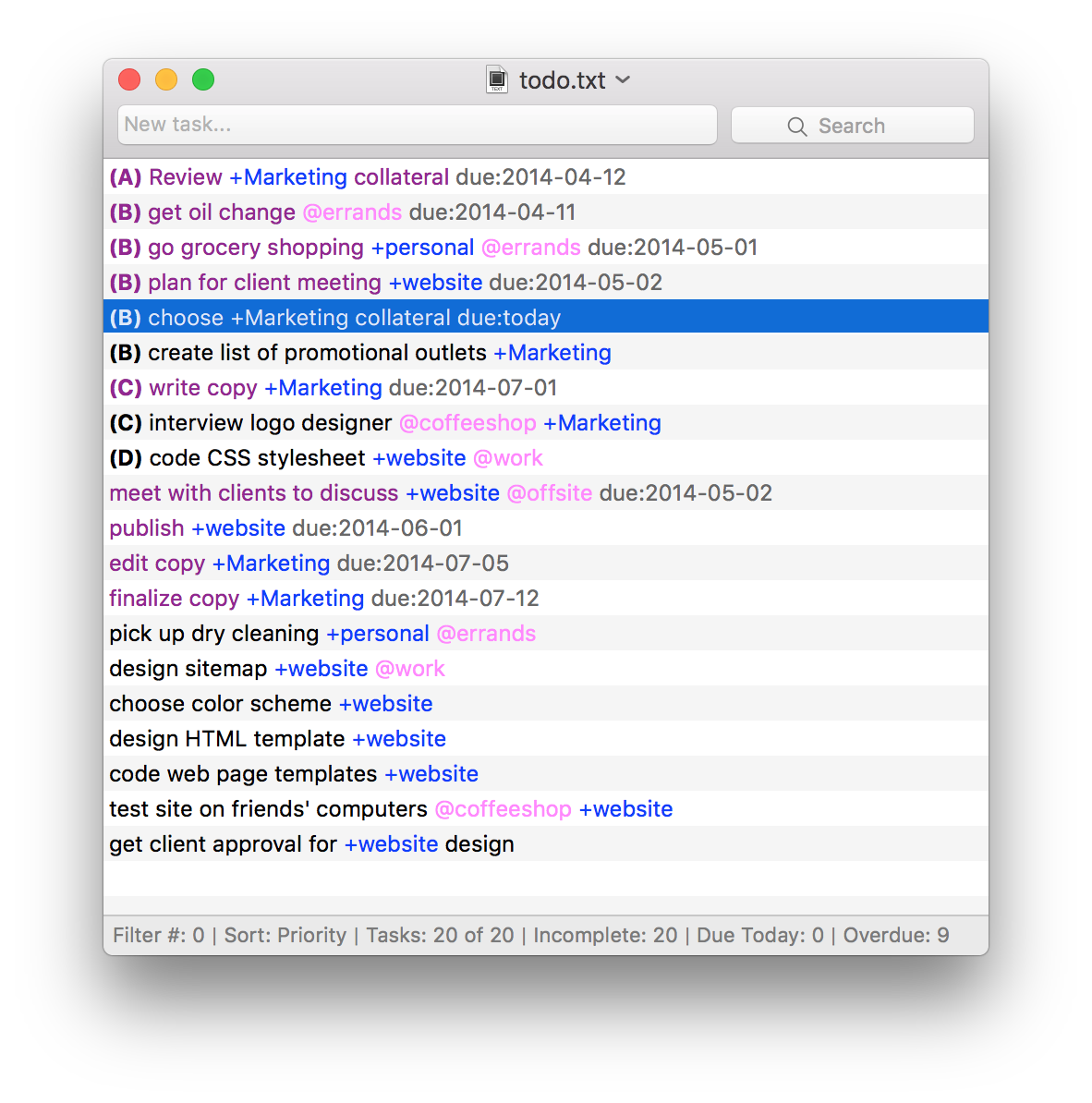
Why I used it: I wrote a blog post back in the day (2017) about adopting todo.txt. Briefly: I was getting tired of task management apps getting increasingly bloated and wanted to get back to a minimalist approach, but I still wanted to keep it digital. Todo.txt was the closest thing to a paper notebook I could find that was not a paper notebook — a plain text file, that I kept on Dropbox and accessed with apps, or with no app but just a plain text editor if I wanted, that did all the important things without any of the stuff I didn’t need or want.
Why I stopped: I wrote a blog post about that too. Two main reasons: First, although supposedly one could keep the main todo.txt file on Dropbox and edit it from anywhere and have Dropbox take care of the syncing of data, in practice this could fail, and one time it did and I lost a ton of data, and all trust in the system as a workflow. Second, although I was trying to get away from apps, the shallow and dormant app ecosystem for todo.txt was keeping me stuck using half-developed apps to manage my data. Even the most popular VSCode extension for todo.txt handling hasn’t been updated since 2018. Basically it seems to have been a hot idea at the time that got people excited, but then everyone stopped caring.
Lesson learned: Sometimes you get what you pay for.
Slack
What is it: I think most people know what Slack does — it’s a workplace-focused communications tool that combines elements of email with text messaging, so people in an organization can collaborate and share information in a multiplicity of ways within the same platform.
Why I used it: Slack was released to the public in 2014, and there was a stretch in the late 2010’s where Slack seemed to me like a perfect solution to the problem of community-building in a distributed network. For example I was leading a task force in the Mathematical Association of America to build the MAA’s social network presence; the task force was spread all over the USA and I set up a Slack workspace to coordinate our communications. When COVID hit, and I was chair of the Math Department, I set up a Slack for our faculty that we used for communication and connection. It was important for us to get out of our email (such a source of stress and uncertainty) for this, as was the need for connection in real time when we couldn’t be present with each other. And to this day I still help administer a Slack workspace for alternative grading.
Why I stopped: Aside from the alt-grading Slack, I don’t use it anymore. In fact I refuse to, and actively avoid doing so, because it promotes what Cal Newport calls the hyperactive hive mind. You can mute Slack notifications, but you cannot triage them using the Clarify process like you can emails. Nor is it simple to connect Slack to other systems you might use for managing information. It is its own thing, one more damned inbox to have to check, and refuses to play nice with a more calm approach to handling messages. That constant pinging still haunts me in dreams.
Lesson learned: The purpose of a tool is to make work easier. If it makes work harder, more plentiful, or both — drop it and run the other way.
Evernote
What is it: Evernote is, or at least was, the granddaddy of all productivity tools, the original “second brain”. It is a system, really an ecosystem, where you put any kind of digital object you want — text, web clippings, audio, video, files — and these entries can be tagged and organized, synced across devices, and then pulled up later with a fast and robust search engine. Sounds great! But, the fact that you might not have heard of Evernote is why it’s perhaps the greatest example of the downfall of a tool.
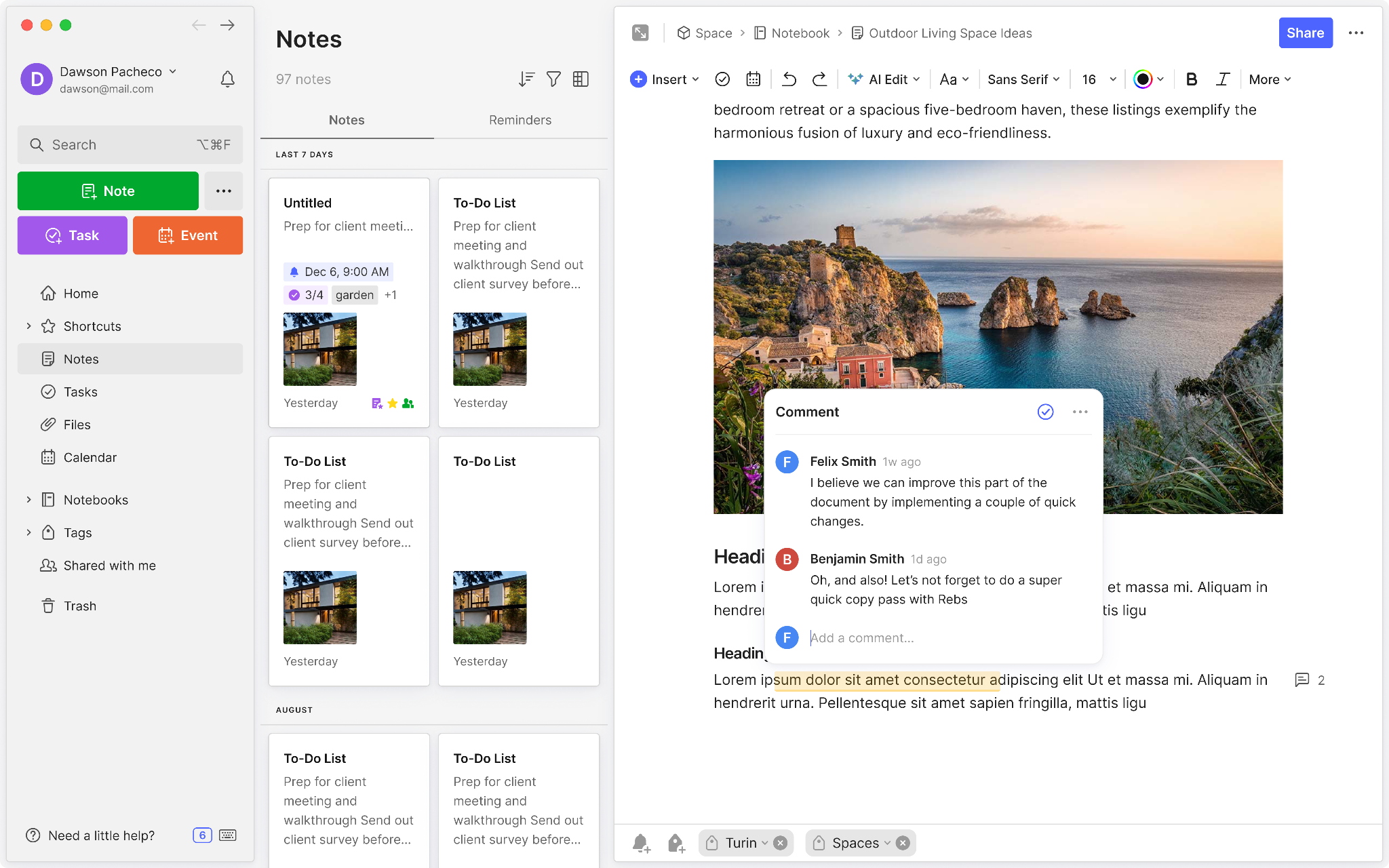
Why I used it: I can’t remember exactly when I discovered Evernote, but it must have coincided with my first GTD explorations. It was immediately the solution to one of my life’s biggest problems: Having crap (some of it important) all over the place, on multiple computers and desk drawers and unprocessed inboxes with no single source where I could find it. I remember over the course of a few weeks relocating all this crap into Evernote, and it was instantly at my fingertips anywhere I had an internet connection. It was truly magical and legitimately is still, in my view, the absolute best of the golden age of productivity software releases from the mid-00’s5.
Why I stopped: For several years Evernote was untouchable. But then came the bloat. Not content with simply being a killer organization app, Evernote’s developers started adding features and add-ons that added questionable value while eating into resources required for core functionality like syncing, and taking away from the minimalist beauty of the tool. There was an add-on for recipes, for example, and an add-on for managing business cards — each potentially useful but not without a cost, not only in terms of a bloated experience but also in dollars, as the price of a subscription started to go up and up to pay for expanded server needs. At one point there were socks for sale rather than fixes to critical issues. Our pleas for attention to the core features ignored, we users stopped caring and eventually left for greener pastures. (For me it was Google Keep and now Obsidian.) In 2023, the company was acquired by Italian developers Bending Spoons and there have been some promising moves back to the app’s roots. But all I know is that I have to go on to the Evernote web app every so often to hunt down a very old note, and the experience is miserable. Which is a bad situation because I have a lot of stuff in Evernote that I have never migrated out.
Evernote’s rise and fall has become something of a case study in the tech world, and this article goes into some more depth.
Lesson learned: Two things here. First, simple tools are the best and when an app starts to lose this realization, start looking for the exits. Second, don’t start putting information into an app or an ecosystem without an exit strategy for exporting it to a portable form you can use somewhere else.
Honorable mention: Tools I no longer use but wish I could
These five tools are all ones that I used for a while but then chose to stop using. But there are three that are worth mentioning, which I used to use but don’t any more, not by choice but because they were shut down.
Wunderlist: Wunderlist was a fantastic task management app. Cleanly designed, not too complicated but feature-filled enough to be useful, web-based, GTD-friendly but also GTD-agnostic. I was just about to commit to using Wunderlist for GTD in 2015, when Microsoft bought it and promptly killed it. Nominally, Microsoft turned it into Microsoft ToDo, which had the look of Wunderlist but almost none of its functionality, rendering it basically nothing more than a fancy Word file where you keep tasks. MS ToDo has gotten a lot better since then, but it’s taken 10 years to do so and it’s still not as good as Wunderlist was.
Google Jamboard: Jamboard was a collaborative online digital whiteboard tool, like a Google Doc except it was a whiteboard. For us educators, and especially during COVID, Jamboard was a God-send: A free web-based tool that could be used either individually or collaboratively, in the classroom or online, using handwriting or typed text, and dead simple to use without a lot of fussing with accounts and permissions. It didn’t have a lot of features but the simplicity was actually a strength. For a time it looked like Google was committing to the product by integrating it into Google Meet and offering expensive hardware digital whiteboards that ran Jamboard. But alas, they shuttered it at the end of 2024.
Google Reader. Ah, Google Reader. If you were into blogs in the mid-00’s like I was, Google Reader was more than an app. It was your personal operating system — a simple, minimalist RSS/Atom feed aggregator that was your central point of contact to the blogosphere. The shutting down of Reader in 2013, seemingly timed to herd users over to the brand-new social network Google+, is still a rallying cry for internet OG’s. We haven’t gotten over it yet.
The takeaway
Tools for productivity and intentionality are important, just like physical tools in your garage are important. Between a snow shovel and my monster 24” snowblower, I know which tool I’d rather use to clear my driveway in a Michigan winter. They make life easier. But there’s a real danger in getting too attached to them, and confusing the tool for the work that the tool does. If you look back on the graveyard of tools you once used but now have discarded, you can begin to find patterns in use that can inform you today.
What are some of the tools in your graveyard, and how did they get there?
All of the tools that I mention here, except when noted, are still around and available, although many have mutated to a form I barely recognize, often because of extensive AI integration.
Beamer, a fork of the LaTeX typesetting language for making math-heavy presentations, is a darling of nerds everywhere but is one of the single worst presentation tools I have ever used. I said what I said.
That should be solely the result of my content and delivery.
Notice how many of these tools were released between 2004 and 2008.
Robert, thanks for this article. It was an engaging read.
I have a question for you. It's a genuine question, I'm not trolling you, and I would be very interested to learn from you.
My question is: if you don't like Beamer, then what's the alternative? How do I create slides with (possibly complicated) mathematical expressions if I don't use Beamer? Admittedly, this is a problem that approximately 0.01% of the general population has to deal with, and I agree that if someone didn't need to create slides with mathematical notation then it would be absurd to use Beamer in place of something like Powerpoint. But for us "nerds" who do need to create slides with mathematical notation, this does seem like the only game in town.
Can Prezi handle mathematical notation? I mean the real stuff, things like integrals and infinite summations, not little fractions. I would be astonished if it did.
Trello is one on my list of tools used but later shelved. Loved it early on. Still like the “card” metaphor for some organizational tasks, as well as kanban boards.
Had a similar experience with Prezi. You could build very cool presentations with it and it was fun to play with initially. Agree on how the tool sometimes distracted from the message. I also decided that I was a slide guy. Sometimes you just gotta own your shortcomings.
I have used Evernote on and off, mostly on, for many years. Things did get very weird in the feature bloat / lack of support era. I do feel the new owners are generally trying to get things back on track. And I’ve got so much stuff in Evernote that I need to retain and don’t know where I could migrate it (and yeah, I’ve evaluated options for migration every 15 to 18 months for what seems like forever).
Could not agree more with you about Jamboard and Reader. At least Jamboard went away before serious dependency set in. But I’m still seriously pissed off about Reader. Google keeps showing cool labs projects that I’d love to try but every time I look at one of them I hear a voice in the back of my head saying “remember, this is google we’re talking about, you’re seriously not going to fall for it again are you?”